
Here's what you need to know
Because you could be missing out on sending or receiving important business emails without even knowing it.
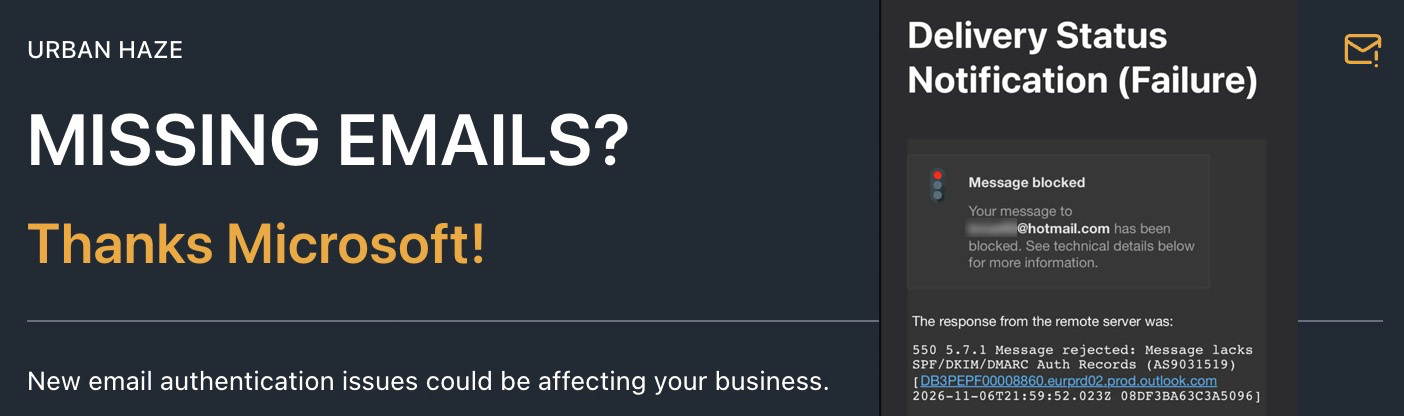
At the end of last week, email operators began reporting that Microsoft was rejecting some legitimate messages sent to personal email services such as Outlook.com, Hotmail and Live.com.
Microsoft has also introduced stricter email authentication requirements for high-volume senders, and businesses using Microsoft 365 need to pay attention to their outgoing email configuration too.
The problem is that email senders need to have the correct authentication records configured for their domain name (DNS), otherwise messages can be rejected showing error 550 5.7.1
What's causing it?
Three technical settings associated with your domain name:
- SPF — identifies which systems are authorised to send email on your behalf.
- DKIM — digitally signs your outgoing messages to help prove they're genuine.
- DMARC — tells receiving email systems how to handle messages that fail authentication check
Recent reports particularly highlight domains without DMARC records, even where other authentication settings are working.
Why is Microsoft doing this?
Think of it as Microsoft's equivalent of telling everyone to stock up on tinned food and bottled water before harder times arrive.
With increasing volumes of spam, scams and malicious emails, Microsoft is strengthening its defences against potentially unpleasant things coming its way.
The intention is sensible, and other email providers may well follow suit. Unfortunately, the implementation has left some legitimate businesses caught in the middle, with emails being rejected and little explanation beyond a technical error message.
It's a good idea, but one that could have been communicated rather better!
Who needs to check?
Pretty much any business sending email using its own domain name.
Whether you use Google Workspace, Microsoft 365 or another email provider, it's worth checking your configuration.
And don't forget websites, contact forms and newsletter services such as Mailchimp or MailerLite. These can send email using your domain too.
What should you do?
You can ask whoever manages your email or DNS to check your SPF, DKIM and DMARC configuration.
If you're comfortable with the technical side, you can tackle it yourself.
Or we can do it for you.
At Urban Haze, we're offering a fixed-price email authentication setup service for businesses using Google Workspace:
£249 + VAT for the first domain
£79 + VAT for each additional domain in the same Google Workspace organisation
We'll work with you to access Google Workspace securely, configure the authentication settings, make the necessary DNS changes and verify the results.
Existing Urban Haze clients receive discounted rates.
Other email systems can be assessed and quoted separately.
Why act now?
Because discovering you've missed an important business enquiry is frustrating.
Not knowing you've missed it in the first place could be considerably worse.
If you're unsure whether your business email is properly authenticated, get in touch now